
Martin: No Filter Fighters
Martin No Filter Fighters: The Browser Fighting Guide
Martin No Filter Fighters is a fast, colorful browser fighting game built around a simple question: can you manage a full fighting-game toolkit without losing the personality of an arcade show? The playable build opens with a pixel-art title screen, then moves through a disclaimer, mode selection, fighter selection, stage selection, and a match. It is designed for quick sessions, but the controls reward deliberate spacing, short confirms, meter management, and sensible use of a sidekick.
This page embeds the supplied playable build directly, so you can play Martin No Filter Fighters online before reading the guide. The game screen identifies itself as an unofficial fan-made demo and says it is not affiliated with Martin, FOX, Martin Lawrence, Tommy Davidson, BET+, or an official entity. Treat the game as a fan project made for entertainment and nostalgia.
What You Do in Martin No Filter Fighters
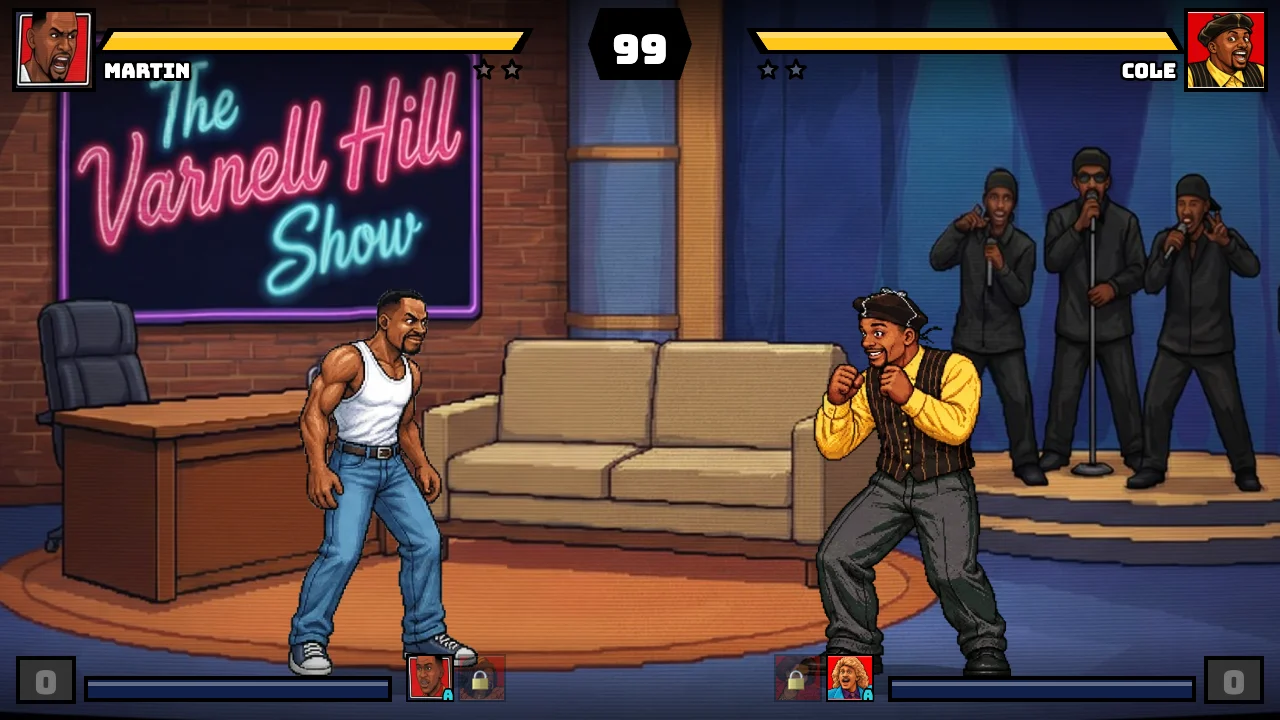
The main loop is recognizable to anyone who has played an arcade fighter. Select a point fighter, choose a sidekick, enter a stage, reduce the opponent's health, and win enough rounds to take the match. The default arcade flow places you in a best-of-three structure: the first fighter to win two rounds takes the match. Each round begins with a 99-second timer, two health bars, and a compact meter system at the bottom of the screen.
The build includes eleven selectable characters plus a random option. The roster shown in the source includes Martin, Varnell, Sheneneh, Gina, Cole, Pam, Tommy, Dragonfly, Jerome, Bruh-Man, and Bob. A sidekick is selected separately, so the choice is about building a small team rather than picking a single avatar and stopping there. The selection screen also prevents the same character from being reused in the same match, which gives the arcade ladder and versus setup a little more structure.

How to Start Your First Match
Press Enter or Start on the title screen. The next screen is a disclaimer; press Enter again to reach Select Mode. Arcade is the clearest first choice because it gives you a conventional sequence of opponents. Training is useful when you want to test movement and attacks without the pressure of a normal round. Versus is designed for two players on one keyboard or with two gamepads. CPU Showcase lets you set up a CPU matchup and watch the fight. Story Mode, Online Versus, Reveal Theater, and Settings are also listed in the menu, although the exact experience depends on the current build and connection.
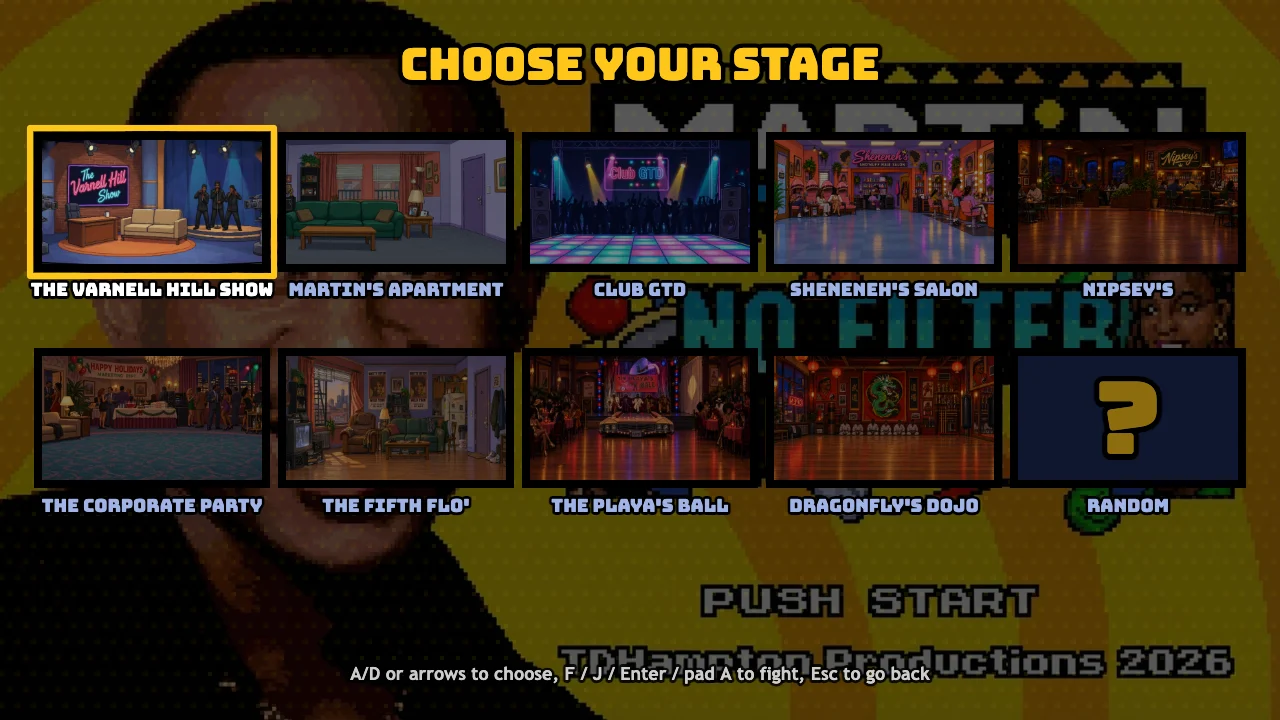
After choosing Arcade, confirm a point fighter. The cursor then moves to the sidekick portion of the selection. Confirm a second character, wait for the CPU to complete its choices, and then choose a stage. The build presents nine named stages and a random choice: The Varnell Hill Show, Martin's Apartment, Club GTD, Sheneneh's Salon, Nipsey's, The Corporate Party, The Fifth Flo', The Playa's Ball, and Dragonfly's Dojo. The Varnell Hill Show is a useful first stage because its large broadcast-set composition makes both fighters easy to read.
The first round has an introduction sequence before control is handed over. Do not assume the game is frozen when the round title and character banter appear. Wait for the fight prompt to finish, then use movement to close distance. If you are practicing, open the pause screen during a fight to review the move summary for the selected characters.
Keyboard, Gamepad, and Touch Controls
The source build exposes two keyboard layouts. In solo modes, Player 1 can use either layout, which is useful when the game is embedded in a page and the first keyboard arrangement is inconvenient.
Player 1 keyboard
- W, A, S, D: move, jump, and crouch.
- F: light punch.
- G: heavy punch.
- V: light kick.
- B: heavy kick.
- H: special move.
- T: Super 1.
- Y: Super 2.
- C: call the sidekick.
- R: block.
- E: taunt, or use the round break when you are caught in a combo.
Player 2 keyboard
- Arrow keys: move, jump, and crouch.
- J: light punch.
- K: heavy punch.
- M: light kick.
- Comma: heavy kick.
- L: special move.
- I: Super 1.
- O: Super 2.
- Period: call the sidekick.
- Right Shift: block.
- P or Enter: taunt, or use the round break.
The game also maps standard gamepad buttons to light punch, heavy punch, light kick, heavy kick, special, supers, and assist. A controller is most comfortable when you want the two attack rows and meter moves close together. On phones and tablets, the build adds a touch joystick, a four-button attack grid, special and super buttons, an assist button, a taunt or break button, and a pause control. The title page includes a landscape prompt, so rotate a portrait device before judging the mobile layout.
Understand the Fight Before Chasing Combos
Movement is the first skill to stabilize. Tap left or right to adjust position instead of holding a direction through the entire screen. A double direction input produces a dash or back dash, while down followed by up produces a super jump. These movement options are more useful when you treat them as spacing tools: dash in to make a normal attack connect, back dash to reset after a blocked string, and super jump when you need to change the vertical angle of an approach.
The four normal attacks cover light and heavy punches plus light and heavy kicks. Light attacks start quickly and are the safest way to check whether you are close enough. Heavy attacks carry more commitment, so use them after you have already established distance or after the opponent whiffs. The special button is character-specific. Its exact animation and range change with the selected fighter, which is why Training mode is valuable even if you intend to play Arcade.
Blocking uses the backward direction or the dedicated block key. Crouching block is useful against grounded pressure, while standing block gives you a better answer to attacks aimed above the legs. The move summary in the pause screen labels the launch input and character-specific special moves, so use it as the final authority for a new fighter instead of assuming every character has the same command list.
Meter, Supers, Assists, and the No Filter Break
Every successful exchange should serve a larger decision. Meter builds as the round develops and powers Super 1 and Super 2. The game treats each individual super as a one-bar move. The assist button calls the selected sidekick when that helper is available, and the assist returns to a cooldown after use. Calling an assist at the right distance can cover an approach, extend a grounded hit, or make an opponent respect space while you recover. Calling it on every neutral exchange leaves you without help when the opponent finally blocks your main attack.
The build also supports a crossover assist. When you are blocking, pressing the assist input can interrupt the opponent's pressure at a meter cost. This is a defensive resource, so do not burn it simply because the icon is available. Wait until the opponent has committed to a long sequence or a predictable approach.
A combo can be linked by tapping light punch during the chain. The game describes this as a link attack or automatic combo route. The round-break input is tied to the taunt button: Player 1 uses E and Player 2 uses P or Enter. It is limited to once per round, so use it when the opponent has actually established a damaging sequence, not at the first hit. When the meter reaches three full bars, both supers can be combined into the No Filter Finish. That is a high-value conversion and a reason to stop spending meter on low-confidence specials.
A Practical Beginner Strategy
Start each round by watching the opponent for two seconds. Note whether the CPU walks forward, jumps, blocks, or immediately attacks. Then choose one response. If the opponent walks forward, a light attack or a short back step gives you information without committing to a slow move. If the opponent jumps, use a grounded heavy or your character's anti-air option once you understand its timing. If the opponent blocks, stop pressing every attack button and take the small positional advantage created by the contact.
Use a three-step rhythm: approach, confirm, disengage. Approach with a dash or a few controlled steps. Confirm whether a light normal connected or was blocked. Disengage with a back step, block, or a jump rather than continuing a sequence you cannot recognize. This rhythm protects your health while you learn the roster.
Do not mash supers at full distance. A meter move is most valuable when the opponent is within range, recovering from a whiff, trapped by an assist, or already hit by a normal. The same rule applies to heavy attacks. The game is colorful and noisy, but the health bars and timer are the useful information. Watch the top of the screen after every exchange.
In Arcade, treat the first opponent as a training sample instead of a score test. Identify the enemy's preferred range, then adjust the next round. If you lose a round, the answer is usually not a longer combo. It is often better movement, earlier blocking, or saving the assist for the moment the CPU approaches.
Advanced Tactics for Repeat Sessions
Once basic spacing feels reliable, practice one confirmed route with each main fighter. A route can be as simple as light punch into heavy punch into special, provided the buttons connect consistently. Add an assist only after the base route works. This makes it easier to see whether the assist creates real advantage or merely adds visual noise.
Use the stage boundaries deliberately. A back dash near the edge has less value than a forward dash toward open space, while a cornered opponent has fewer retreat options. When your opponent is near a boundary, use short attacks to keep them honest and reserve a super for a confirmed hit. When you are cornered, block first, then look for a crossover assist or a break rather than trying to jump through every attack.
Manage the round timer as a resource. With 99 seconds available, there is no need to force an exchange when you have a health lead. Walk backward, block, and make the CPU take the risk. If you are behind on health, use the remaining time to create a clean approach and spend meter on a confirmed sequence. A desperate dash into a ready opponent usually gives away the round.
Training mode is the correct place to test the details that are hard to see in Arcade. Check how far a special reaches, whether a heavy attack leaves you close enough for a follow-up, when an assist becomes available again, and how the selected character behaves after a jump. The pause screen also lists the fighter's launcher, special, supers, assist, block, and taunt or break inputs.
Troubleshooting and Browser Play
If the game appears black, wait for the asset loader to finish before interacting. The build loads a substantial set of art and audio assets, and the first launch can take longer than a later launch. Click the game frame once before pressing Enter so the embedded canvas owns keyboard focus. If a key does nothing, check that the browser tab is focused and that the game has moved past the title and disclaimer screens.
On mobile, use landscape orientation and give the touch interface a moment to appear. If the frame feels cramped, use the game's fullscreen control where available. On desktop, a current Chromium, Firefox, or Safari browser should handle the HTML5 canvas, but performance can still vary with background tabs and device power. Audio may remain muted until the first user gesture because browsers restrict autoplay; pressing the title screen is the expected way to unlock it.
Frequently Asked Questions
Is Martin No Filter Fighters an official Martin game?
The playable build labels itself an unofficial fan-made demo and states that it is not affiliated with Martin, FOX, Martin Lawrence, Tommy Davidson, BET+, or an official entity. The page is presented here as a browser-accessible fan project.
How do I play Martin No Filter Fighters online?
Open the game above, click the canvas, press Enter through the title and disclaimer screens, choose a mode, select a fighter and sidekick, pick a stage, and wait for the round introduction to finish.
What are the main Player 1 controls?
Use W, A, S, and D for movement; F, G, V, and B for the four normal attacks; H for special; T and Y for supers; C for assist; R for block; and E for taunt or the once-per-round break.
Can I play on a phone?
The source build includes a touch joystick and on-screen attack, special, super, assist, taunt, pause, and fullscreen controls. It also asks portrait users to rotate the device, so mobile play is intended in landscape orientation.
How does the sidekick work?
The sidekick is selected before the fight and is called with the assist input. The helper has a cooldown, so use it to cover an approach, extend a confirmed attack, or create a defensive crossover rather than spending it whenever the button lights up.
What is the No Filter Finish?
The game describes the team finisher as a three-bar action that uses both supers together. Build the full meter, get close enough for the move to connect, and press the two super inputs rather than wasting the meter from neutral.
Martin No Filter Fighters works best when you treat its spectacle as a layer over clear fundamentals. Start with movement and blocking, learn one safe attack route, then add the sidekick and meter decisions. The browser build makes that loop easy to repeat: choose a different fighter, select a new stage, and test whether your plan survives the next arcade opponent.