
Stickman Kombat 2D
Stickman Kombat 2D: Fighter Roster, Controls and Combo Guide
Stickman Kombat 2D is a fast one-on-one fighting game where shadowy stickman warriors clash in explosive 2D arenas. Each fighter has a weapon, a style, and special moves, and the game rewards players who learn to chain attacks, block at the right moment, and launch opponents into aerial combos. It feels like a classic arcade fighter compressed into a quick browser session, with enough modes to keep you coming back.
You can play Stickman Kombat 2D online for free here, with no download required. This guide explains how the tutorial works, what each menu mode offers, the full keyboard layout for one and two players, and the combo techniques that turn a beginner into a stickman champion.
What Is Stickman Kombat 2D?
At its heart, Stickman Kombat 2D is a 1v1 arena fighter. You choose a stickman warrior, face an opponent, and try to knock them out with punches, kicks, and special attacks. The characters are drawn as dark silhouettes with bright accents, and each has its own look and weapon, from the scythe-wielding Reaper to a red-masked fighter simply called Red.
The game mixes fighting-game fundamentals with arcade progression. You start with only a few fighters unlocked, earn coins, and open up new warriors by completing challenges. Multiple modes give you different ways to fight, from structured training to two-player battles on one keyboard.
The Tutorial: Learning Step by Step
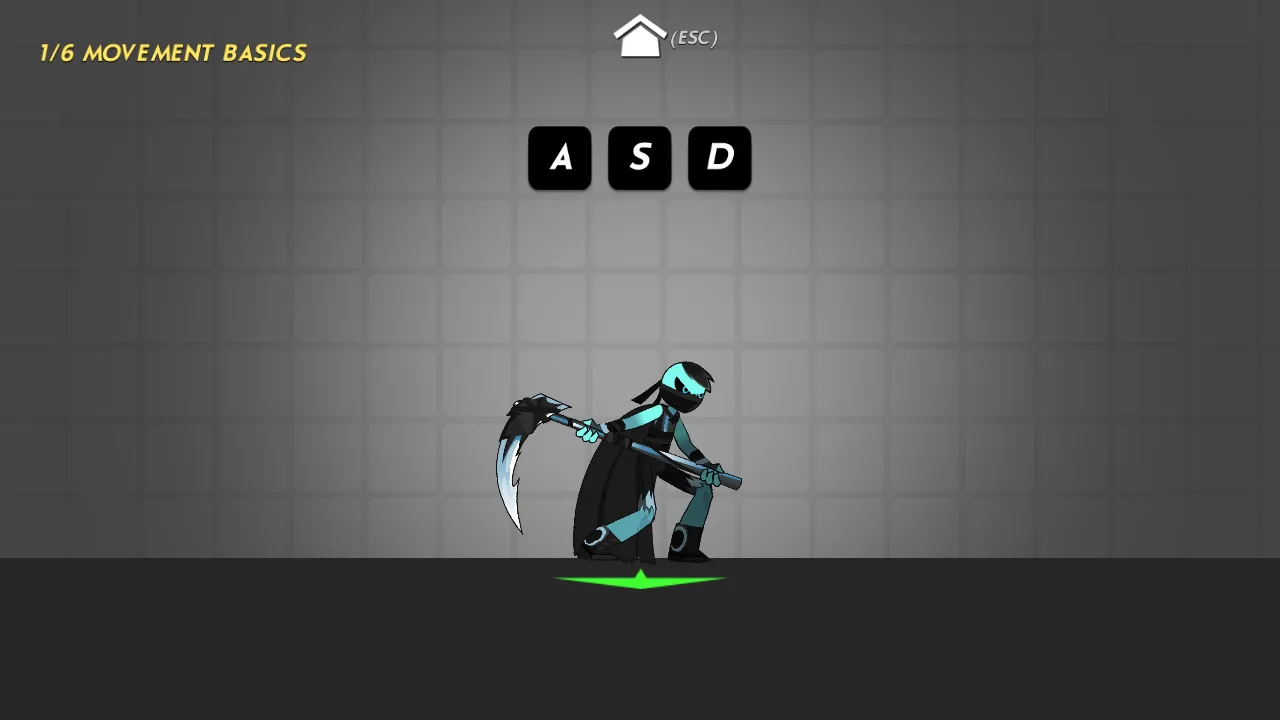
When you start for the first time, Stickman Kombat 2D runs a short tutorial. The first lesson, labelled 1/6 Movement Basics, shows the A, S, and D keys on screen and asks you to press them. Each key turns green once you have used it, so you can see your progress at a glance. Further lessons build up to attacks, specials, and combos.
Do not skip it. The tutorial is short, and it teaches the inputs that every later fight depends on. If you want to leave it, press Esc to return to the menu.
Menu Modes
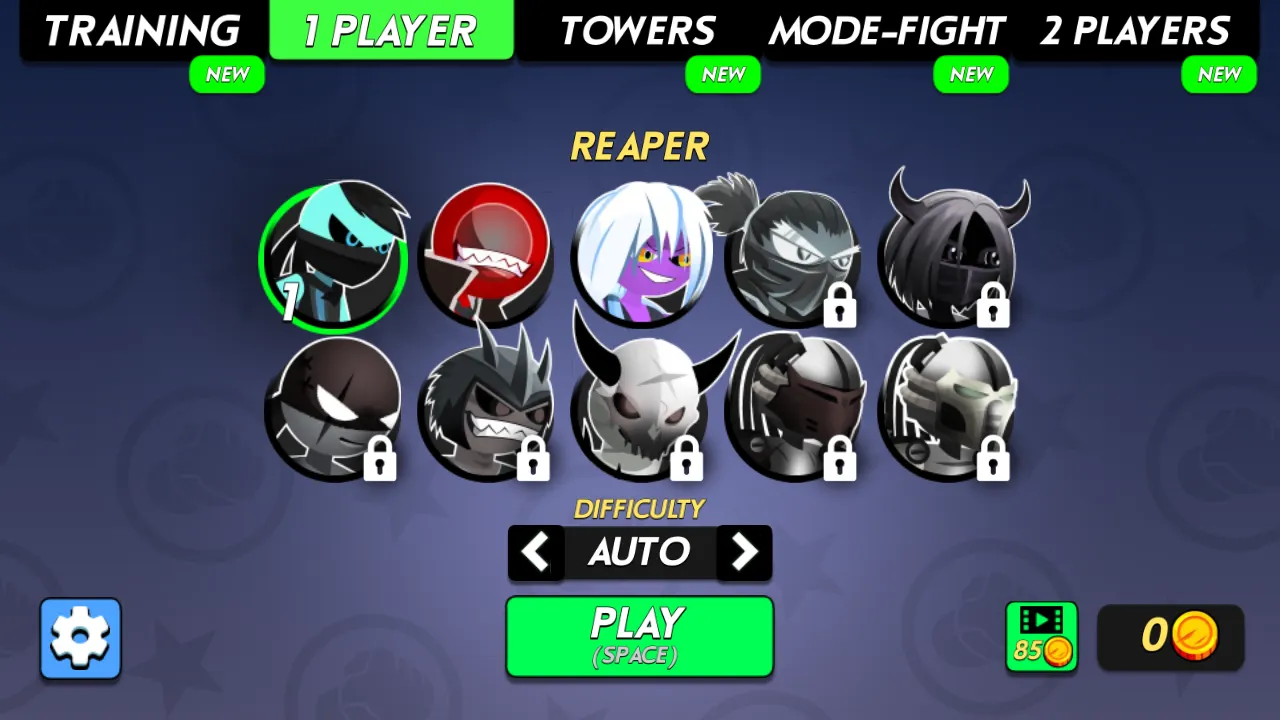
The main menu is split into tabs across the top of the screen:
- Training: practise moves and combos without pressure.
- 1 Player: fight against computer opponents.
- Towers: a ladder of fights. Completing certain towers unlocks new fighters. For example, the game offers the fighter Lord for free when you complete the tower called Lord.
- Mode-Fight: special fight rules for variety.
- 2 Players: two people on one keyboard.
Below the tabs is the fighter roster. Locked characters show a padlock. Under the roster you can set the difficulty, with Auto as the default, and press Play or Space to begin. Your coin total sits in the bottom-right corner, and a gear icon in the bottom-left opens settings.
Stickman Kombat 2D Controls
The game's published control layout uses the keyboard for full control. Mouse clicks and taps also work for menus and touch play.
One player
- W, A, S, D: move and jump.
- J: attack.
- K: special move.
- Back + K: second special move.
- S + J: uppercut.
- Hold S: block.
Two players on one PC
- Player 1: W, A, S, D to move, F to attack, G for special moves.
- Player 2: I, J, K, L to move, colon to attack, quote for special moves.
How Combos Work
Combos are the core skill in Stickman Kombat 2D. The game's guidance is simple: press attack at the right moment to continue the combo. That means mashing is not ideal. Instead, press J in rhythm with your character's animation. When the timing is right, each hit flows into the next.
There is also an aerial trick. Jump behind the enemy and hit them, and you trigger aerial strikes. Getting behind an opponent is risky, but the reward is a combo that is hard to defend against.
A simple beginner combo
1. Walk into range.
2. Press J a few times in rhythm to land a short chain.
3. Finish with K for a special move.
An uppercut starter
1. Hold S and press J to uppercut.
2. Follow the opponent with attacks while they are off balance.
Defense: Blocking and Spacing
Hold S to block. Blocking is essential against stronger opponents, who punish wild attacks. A strong habit is to block first when an opponent starts a combo, then counter as soon as their chain ends. Spacing matters too. Stay just outside the opponent's reach until you see them commit, then step in.
Choosing Your Fighter
Each stickman has a different weapon and style. The Reaper, available from the start, swings a scythe, which gives good reach. Other fighters such as Red have their own feel. Try every unlocked fighter in Training before taking them into Towers or 1 Player. The best fighter is the one whose timing you understand.
As you play, coins let you unlock more of the roster. Towers are especially worth completing, since some reward you with new fighters.
Reading the Fight Screen
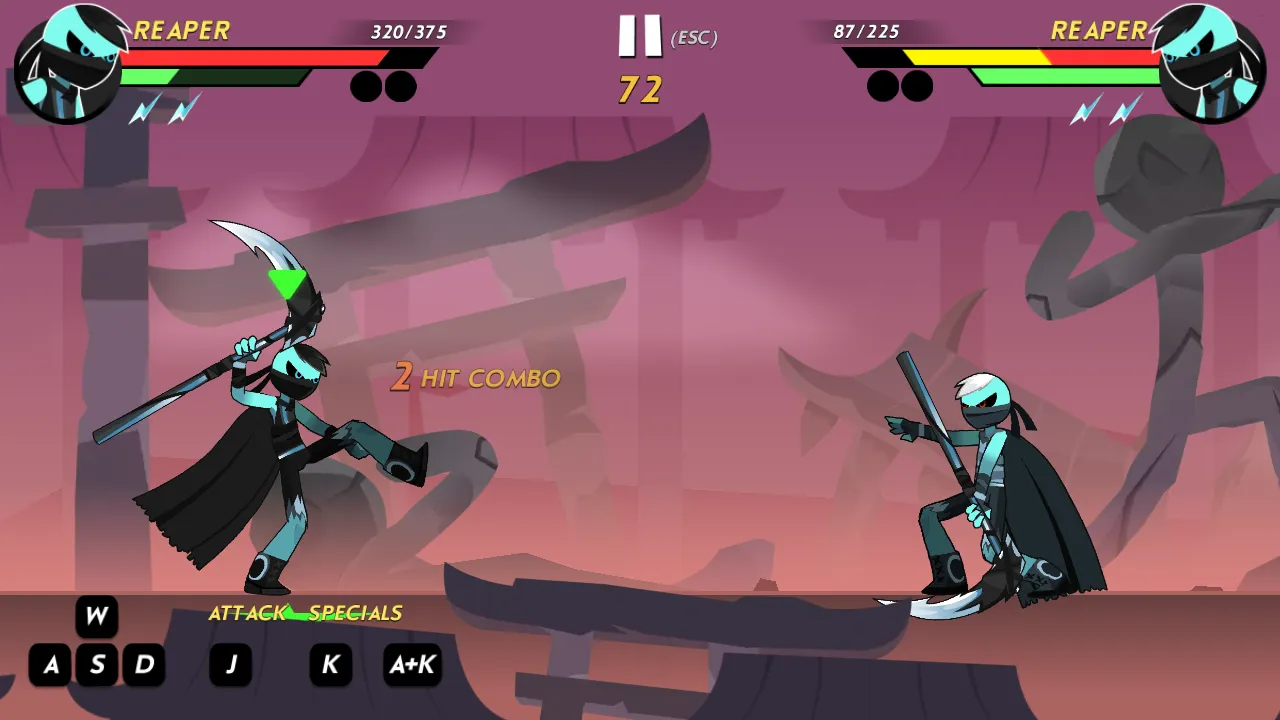
During a match, both fighters' portraits and health bars sit at the top of the screen. Each bar shows exact numbers, so you can see precisely how much damage a combo dealt. The round timer counts down in the center, next to a pause button that also responds to Esc. When you land consecutive hits, a combo counter appears, such as 2 Hit Combo, which is a handy way to check whether your timing is working.
At the bottom-left corner, the game keeps a compact control reminder visible: W above A, S, and D for movement, J for attack, K for specials, and A plus K for the alternate special. If you forget an input mid-fight, a quick glance at the corner is enough.
Practising in Training Mode
Training is where combos become muscle memory. Pick one fighter and spend a few minutes on three drills. First, walk into range and land a three-hit chain with timed J presses. Second, start with an uppercut using S plus J and follow the opponent. Third, jump over an opponent and attack from behind to trigger aerial strikes. Once each drill works most of the time, take that fighter into 1 Player or Towers. Training keeps the pressure low so you can focus on rhythm rather than survival.
Strategy Tips
- Learn timing, not speed. Combos depend on rhythm. Slow down and time your presses.
- Use specials as finishers. Special moves hit hard. Put them at the end of combos rather than throwing them from far away.
- Block more than you think. Against tougher opponents, a patient guard wins more rounds than constant attacking.
- Get behind opponents. The aerial strike trick is powerful. Practise it in Training.
- Climb Towers for unlocks. They are the most reliable way to grow your roster.
Stickman Kombat 2D FAQ
Is Stickman Kombat 2D free?
Yes. You can play Stickman Kombat 2D online for free in your browser on this page.
Can two people play?
Yes. The 2 Players mode supports two players on one keyboard with separate controls.
How do I unlock new fighters?
Earn coins and complete Towers. Some towers reward a specific fighter, such as Lord.
How do I do combos?
Press attack at the right moment to continue the chain, and jump behind an opponent and hit to trigger aerial strikes.
How do I block?
Hold S to block.
Stickman Kombat 2D packs a full arcade fighter into a quick, stylish stickman package. Complete the tutorial, learn the rhythm of your combos, block before you counter, and climb the Towers to build your roster. Every fight sharpens your timing, and every win brings you closer to the top.